

Our Verdict
A dedicated study desk and a multi-purpose desk each have real strengths, and neither is universally better. For most first-year students working with limited dorm space, a thoughtfully organized hybrid setup — one that can shift into focused-study mode quickly — offers the most practical value. The key is designing intentionally rather than letting clutter decide for you.
| Best for | Recommended |
|---|---|
| Students who struggle to concentrate and need a clear mental boundary around study time | Study-first desk setup |
| Students with creative hobbies, gaming routines, or frequent video calls who need one desk to do it all | Multi-purpose desk setup |
| Most dorm students balancing academics with entertainment in a tight space | Hybrid approach with quick-switch organization |
Why Your Desk Configuration Actually Matters
Your desk is likely the single most-used piece of furniture in your dorm room. It's where you write papers, attend virtual lectures, decompress after class, and possibly eat lunch. Because it handles so many roles, the way it's arranged has a direct effect on how well you can shift between focused work and everything else.
Research in environmental psychology consistently finds that physical cues — clutter, ambient noise, screen proximity — influence cognitive load and attention. In plain terms: a desk that looks like a gaming station signals "play" to your brain, even when you sit down to study. If you've ever found it hard to concentrate at your own desk, the setup itself may be part of the problem. See our guide to common study environment mistakes for a fuller breakdown.
Understanding the difference between a study-optimized desk and a multi-purpose one helps you make deliberate choices rather than default ones.
The Study-First Desk: What It Looks Like and Why It Works
A desk built for studying keeps the surface as clear as possible. The goal is to reduce visual noise so your attention stays on the material in front of you. Core elements include:
- Minimal surface items: Only what you need for the current session — a notebook, a pen cup, and your laptop or textbook. Everything else is stored or out of sight.
- Neutral lighting: A directional desk lamp (ideally positioned to the left if you're right-handed) reduces eye strain and signals task-mode. Avoid overhead lighting alone, which causes glare on screens.
- Ergonomic alignment: Monitor or laptop screen at roughly eye level; elbows at a 90-degree angle to the desk surface. Long study sessions compound poor posture quickly — see our article on what prolonged sitting does to your body.
- No passive entertainment triggers: Game controllers, headphone stands, or a second monitor set up for streaming all pull attention. Store them when studying.
Make Study Mode the Default State
Instead of trying to clear distractions before every session, design your desk so the clutter-free study configuration is where it starts and ends each day. Multi-purpose accessories go away after use — not before study begins. This small mindset shift reduces the friction of getting started and reinforces a consistent study habit. For more on structured study habits, see structured study techniques compared.
Pairing a study-first desk with a structured schedule amplifies the effect. Check out our guide to building a study schedule for practical planning steps.
The Multi-Purpose Desk: Flexibility With Trade-Offs
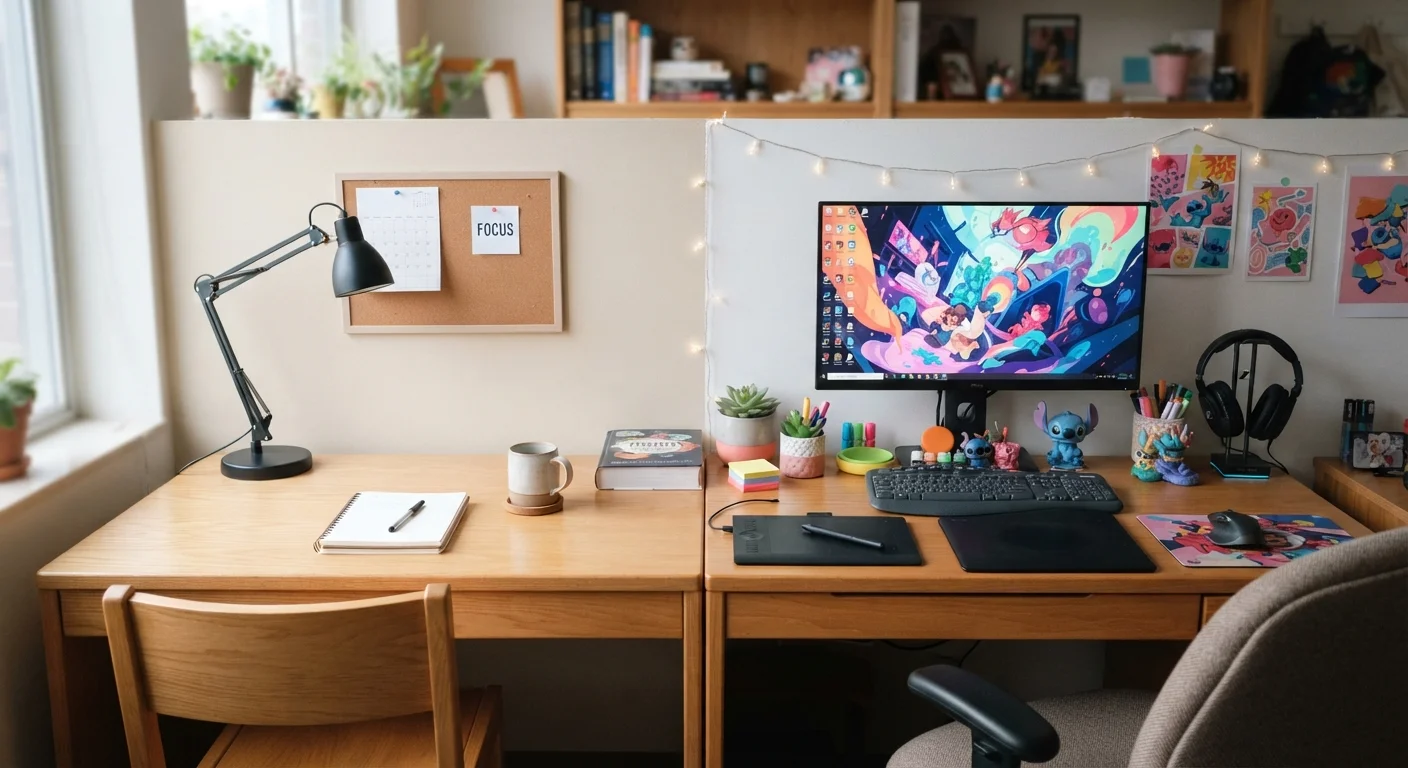
A multi-purpose setup accommodates gaming, digital art, video production, or frequent video calls alongside academic work. It typically features more hardware — a larger monitor, drawing tablet, external webcam, or audio interface — and more cables. The advantages are real: you consolidate everything into one workspace and avoid rearranging constantly.
The trade-offs are equally real. More peripherals mean more visual clutter, more distraction triggers, and more cognitive switching cost when you sit down to study. Without intentional organization, the desk can feel like a different environment depending on what's open on your screen, which weakens the mental association between "desk" and "focused work."
Strategies that help multi-purpose desks stay study-functional:
- Use a desk pad or surface divider to mark a dedicated "study zone" within the desk area.
- Route and label cables so the surface doesn't feel chaotic.
- Close or hide non-academic apps and browser tabs before study sessions start — the screen is part of the environment.
- Consider a separate, small monitor arm that lets you angle a second screen away during study time.
Side-by-Side: Key Differences at a Glance
The table below compares both approaches across the criteria most relevant to dorm students.
| Study-First Desk | Multi-Purpose Desk | |
|---|---|---|
| Surface clutter | Minimal — only active task materials | Higher — multiple peripherals present |
| Focus quality | Stronger environmental cue for deep work | Requires intentional mode-switching |
| Versatility | Limited — not optimized for other tasks | High — supports gaming, art, calls, study |
| Setup cost | Lower — fewer peripherals needed | Higher — more hardware and accessories |
| Best dorm fit | Students prioritizing GPA and focus | Students with active hobbies and heavy tech use |
| Ergonomic risk | Lower when set up correctly | Higher if multiple screens add poor posture |
| Transition effort | Low — already in study mode | Medium — requires deliberate reset to study mode |
Neither setup is perfect. The study-first desk wins on focus; the multi-purpose desk wins on versatility. Deciding which matters more on a given day — or finding a hybrid that handles both — is the real skill.
Building a Hybrid Setup in a Small Dorm Space
Most dorm students don't have the luxury of two separate desks. A hybrid approach works by designing the desk in "modes" that are fast to switch between. The idea is to make study mode the default state — clutter-free and ready — and multi-purpose mode something you intentionally activate and then reset afterward.
Practical steps to build a dorm-friendly hybrid:
- Start with the study baseline. Decide what the desk looks like at rest: clear surface, lamp, laptop or monitor at eye level. That's your default.
- Assign a home for every non-study item. A small shelf, a drawer, or a storage bin under the desk keeps controllers, art supplies, and cables off the surface when not in use.
- Use physical rituals to switch modes. Putting on headphones, placing a notebook to the side, or turning off a second monitor can act as a reliable signal to your brain that study time has started.
- Audit the setup monthly. Dorm desks accumulate items quickly. A short reset at the start of each month keeps the system from drifting.
If you're still figuring out your broader living situation, our article on choosing the right apartment type covers how space constraints shape your study environment choices too.
The content provided on our blog site traverses numerous categories, offering readers valuable and practical information. Readers can use the editorial team’s research and data to gain more insights into their topics of interest. However, they are requested not to treat the articles as conclusive. The website team cannot be held responsible for differences in data or inaccuracies found across other platforms. Please also note that the site might also miss out on various schemes and offers available that the readers may find more beneficial than the ones we cover.